
Error message
This page contains content restricted to UK students, faculty, and staff. Please log in with your linkblue credentials to view this page.Cybersecurity Notification | Fake Microsoft Defender Pop-Up
UK Information Technology Services (UK ITS) would like to inform students, faculty, and staff of a known scam that impersonates a Microsoft support page.
The scam appears after clicking a malicious link currently hosted on external websites that then directs the recipient to a fake Windows Defender Security Center page that urges calling a security helpline. See a below screenshot for an example of this scam.
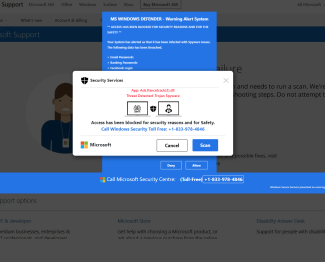
Things to look for to detect a scam:
- Sense of urgency
- Incorrect grammar and/or spelling mistakes
- Sender email address is not recognizable or does not match the sender name
Tactics that are especially common in pop-up scams:
- Statements that you won something
- Computer or mobile device scan
- Exclusivity (e.g., secret access)
If you are unsure if an email is a scam, please do not click any unfamiliar links or call any unfamiliar phone numbers. To report a scam, please contact your department or college IT representative or ITS Customer Services at 859-218-HELP(4357) or go.uky.edu/techhelp.
Cybersecurity Tips & Tricks
See below for important things you need to know:
- How do I report spam and phishing emails?
- How do I access cybersecurity courses in myUK Learning?
- IT Administrative Regulations, Policies, Standards, Guidelines, Etc.
- Cybersecurity Best Practices When Working Remotely
More information on types of attacks & tips to share on social media at its.uky.edu/cybersafe.